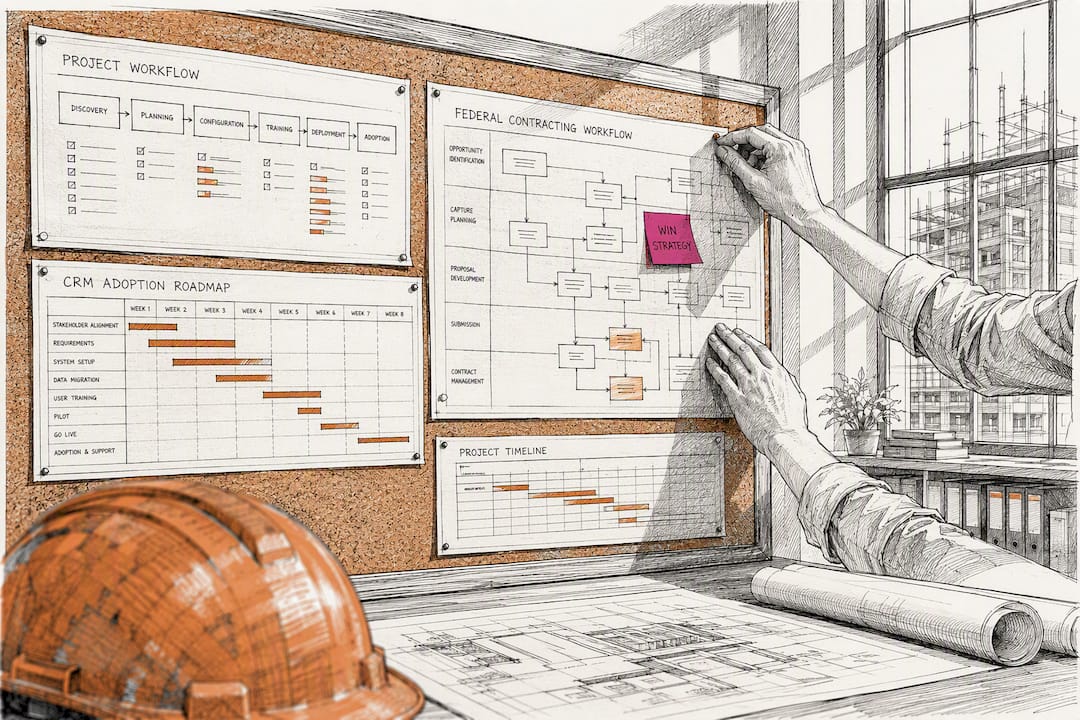
90 Days to CRM Adoption for Federal Construction Contractors
Implementing a construction CRM centralizes pursuits, automates follow-up, and creates the institutional data your firm needs to scale. Most firms see measurable lead response improvement and a cleaned-up pipeline within the first 90 days, provided someone owns the rollout internally. Expect a real commitment of weeks to months depending on firm size, not a weekend software install.
TL;DR:
- Construction-specific CRMs focus on tracking pursuit stages, document storage, and integrations rather than traditional sales funnels, requiring weeks to months for full implementation.
- Clear ownership roles, phased rollout, and ongoing training are critical for successful adoption, with leadership alignment and data cleanup being essential early steps.
- Prioritizing improvements in lead response time yields the quickest ROI, with firms typically seeing measurable gains within 90 days.
- For federal contracts, a CRM must centralize compliance documentation linked to bid opportunities, past performance, and payroll records to avoid disqualification.
- Implementation costs often double initial licensing fees due to customization, data migration, and support, making detailed vendor vetting and pilot testing vital.
Table of Contents
- What Does a Construction CRM Actually Do?
- Who Uses the CRM, and What Do They Need From It?
- How Do You Choose the Right CRM for Your Firm?
- The Implementation Roadmap: From Kickoff to Optimization
- How CRM Supports Federal Procurement Readiness
- What Should You Prioritize First?
- How Federal-rconstructionsolutions Supports Your CRM Rollout
- Sources
- FAQ
What Does a Construction CRM Actually Do?
A construction CRM is not a rebadged sales tool. Generic CRM platforms are built around a linear sales funnel: lead, opportunity, close. Construction work does not move that way. A single pursuit might sit in preconstruction for a year, get shelved when funding stalls, resurface as a design-build opportunity, and eventually split across three subcontractor scopes before anyone signs a contract. Spreadsheets can’t track that lifecycle, and neither can a CRM designed for software sales teams.
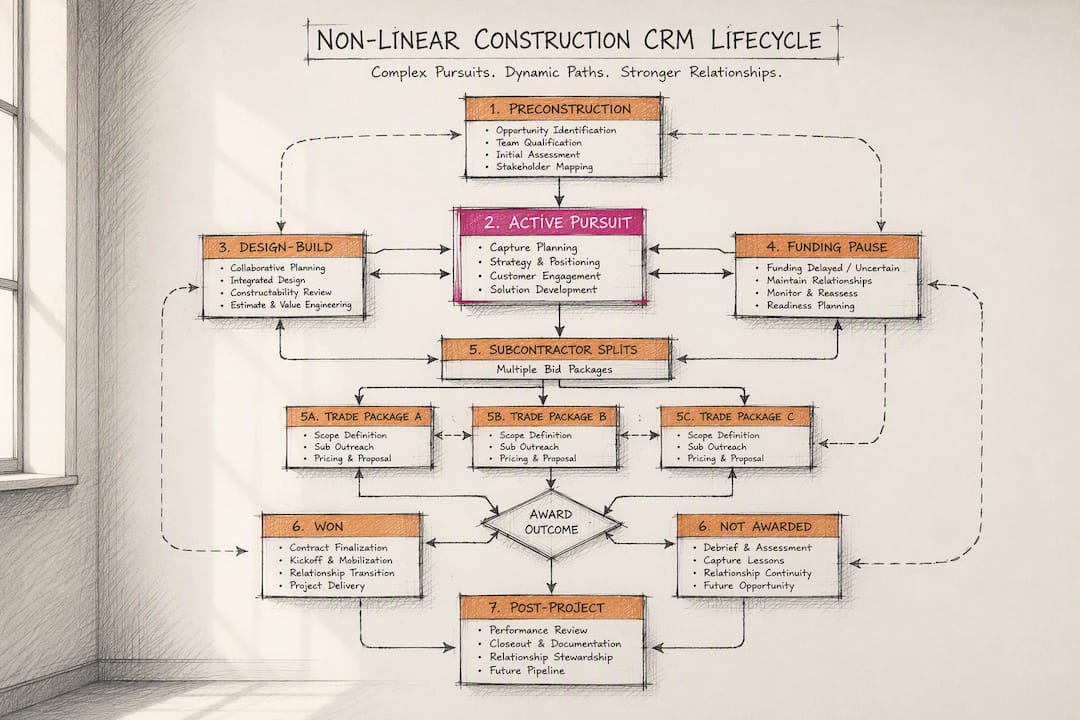
Purpose-built construction CRM software tracks the pursuit lifecycle instead of forcing it into a generic pipeline. That distinction matters more than most vendors admit during a sales demo, because it determines whether your estimators and business development staff will actually use the tool six months from now.
The core features that separate construction-specific platforms from repurposed sales tools include:
- Pursuit stages mapped to real workflow — lead, qualification, proposal, award, and handoff to operations, not “prospect” and “customer.”
- Document attachments tied to each record — plan sets, RFP packages, bonding letters, and insurance certificates stored against the opportunity, not buried in someone’s email.
- Mobile and offline access — field superintendents and estimators working a jobsite without signal still need to log activity and pull specs.
- Two-way integrations with estimating software, accounting platforms, and bid boards like ConstructConnect or BuildingConnected.
- Activity logs and audit trails that capture who talked to whom, when, and what was promised, so institutional knowledge survives when someone leaves.
The financial case for making this switch is not abstract. A joint Autodesk and FMI report on disconnected construction data found that fragmented information costs the industry hundreds of billions of dollars globally, largely from time spent searching for records that should have been centralized in the first place. Every hour an estimator spends hunting through email threads for a bid history is an hour not spent pricing the next job.
AI-driven automation has a real role here, but it augments process rather than replacing it. Market research on AI-powered construction CRM tools suggests automated follow-up and proposal drafting can cut time-to-proposal by roughly 28% when the automation is tightly wired into existing workflows. That number only holds up when the underlying data is clean and the stages are configured correctly. Bolt AI features onto a messy CRM and you just automate the mess faster.
Who Uses the CRM, and What Do They Need From It?
A construction CRM implementation fails more often from unclear ownership than from bad software. Every role touching the pipeline needs a defined minimum input, or adoption collapses within a month.
- Business development staff need fast lead capture, pursuit stage tracking, and a way to log every touchpoint with an owner or GC contact. Their minimum input: update pursuit stage weekly, log every call or meeting the same day it happens.
- Estimators need document storage linked to each opportunity, plus visibility into which pursuits are moving from budget to hard bid. Their minimum input: attach final estimate and bid results to the record within 48 hours of submission.
- Project managers need a clean handoff package when a pursuit converts to an awarded job. Their minimum input: confirm receipt of scope, contract terms, and client contacts inside the CRM, not over a hallway conversation.
- Leadership needs dashboard-level visibility into pipeline value, win rates by pursuit type, and bottlenecks by stage. Their minimum input: review the pipeline dashboard weekly and flag stalled records.
A typical workflow runs like this: BD identifies a public works opportunity, logs it as a lead with the agency contact and bid deadline attached. Once qualified, the estimator pulls the plan set stored in the CRM, builds pricing, and attaches the final bid. If the firm wins, the record converts to a project, and the PM inherits a handoff package that includes the original scope, client contacts, and any compliance notes gathered during pursuit. Nothing gets retyped, and nothing gets lost in a forwarded email chain.
Governance requires assigning four roles before launch: a champion who owns the rollout and answers day-to-day questions, a trainer who runs role-specific sessions, an auditor who checks data quality weekly, and clear input owners for each field so no one assumes someone else is entering it. According to the AGC’s CRM playbook for contractors of any size, a CRM only turns tribal knowledge into company knowledge when clear metrics and accountable roles back it up.
A short weekly audit checklist helps managers catch drift early: check that every pursuit updated in the last seven days has a stage change or activity log, confirm no opportunity sits untouched for more than two weeks without a note, and verify that won jobs converted to project records within 48 hours of contract signing.
How Do You Choose the Right CRM for Your Firm?
Start by defining success metrics before you look at a single vendor demo. A firm chasing federal contracts needs different fields than a firm doing private commercial tenant improvements. Write down three to five outcomes you’re trying to hit, whether that’s cutting proposal turnaround time or reducing the number of pursuits that die from missed follow-up, before you evaluate anything.
Prioritize these features and integrations when you shortlist vendors:
- Pursuit-stage customization that matches your actual sales process, not a generic template.
- Native or API-based integration with your estimating software and accounting platform.
- Document storage with version control for plan sets and proposal drafts.
- Mobile app functionality that works offline on a jobsite with no signal.
- Reporting that breaks down win rate by project type, size, and referral source.
Total cost of ownership is where most firms get surprised. Licensing fees are the visible number, but implementation costs, ongoing admin time, and integration work with existing software often double the sticker price in year one. Ask every vendor for a line-item breakdown that separates software licensing from implementation and support fees, and get it in writing before you sign.
Pro Tip: Ask every finalist vendor to run their demo using one of your actual past pursuits, not their canned sample data. If the demo team can’t map your real workflow onto their platform in real time, that’s a warning sign about how the actual implementation will go.
Before committing, run a paid pilot with a small group, real data, and one full pursuit cycle. Check references by asking past clients specifically how long adoption took and what broke during their first 90 days, not just whether they’re happy overall.
The Implementation Roadmap: From Kickoff to Optimization
A phased rollout beats a single “go live” date every time. Skipping phases is the single biggest reason implementations stall.
- Phase 0: Leadership alignment. Define your KPIs (lead response time, pursuit-to-win rate, days from award to handoff) and appoint the governance roles covered above before a single vendor contract is signed.
- Phase 1: Requirements mapping and shortlist. Document your actual pursuit stages, required fields, and integration needs, then match those requirements against two or three vendors using the buying criteria above.
- Phase 2: Data inventory and pilot migration. Audit existing spreadsheets and legacy systems, clean duplicate and stale records, and run a pilot migration using a small sample in a sandbox environment before touching the full dataset. A pilot pulling roughly 10% of records, drawn from the VBWebSol implementation guide, surfaces field-mapping errors before they contaminate your live system. Keep the legacy system in read-only mode during this phase so nothing gets double-entered or lost.
- Phase 3: Configuration and Go/No-Go scoring. Build out pursuit stages, automations, and handoff templates, then score your configuration against a Go/No-Go checklist covering data accuracy, integration function, and user access before rollout.
- Phase 4: Role-specific training and phased rollout. Train each role separately rather than running one generic session for the whole company, and lean on the internal champions identified earlier to answer questions in real time.
- Phase 5: Adoption tracking and optimization. Monitor weekly adoption metrics for the first quarter, then expand into deeper automation, AI-assisted proposal drafting, or additional integrations once the base workflow is stable.
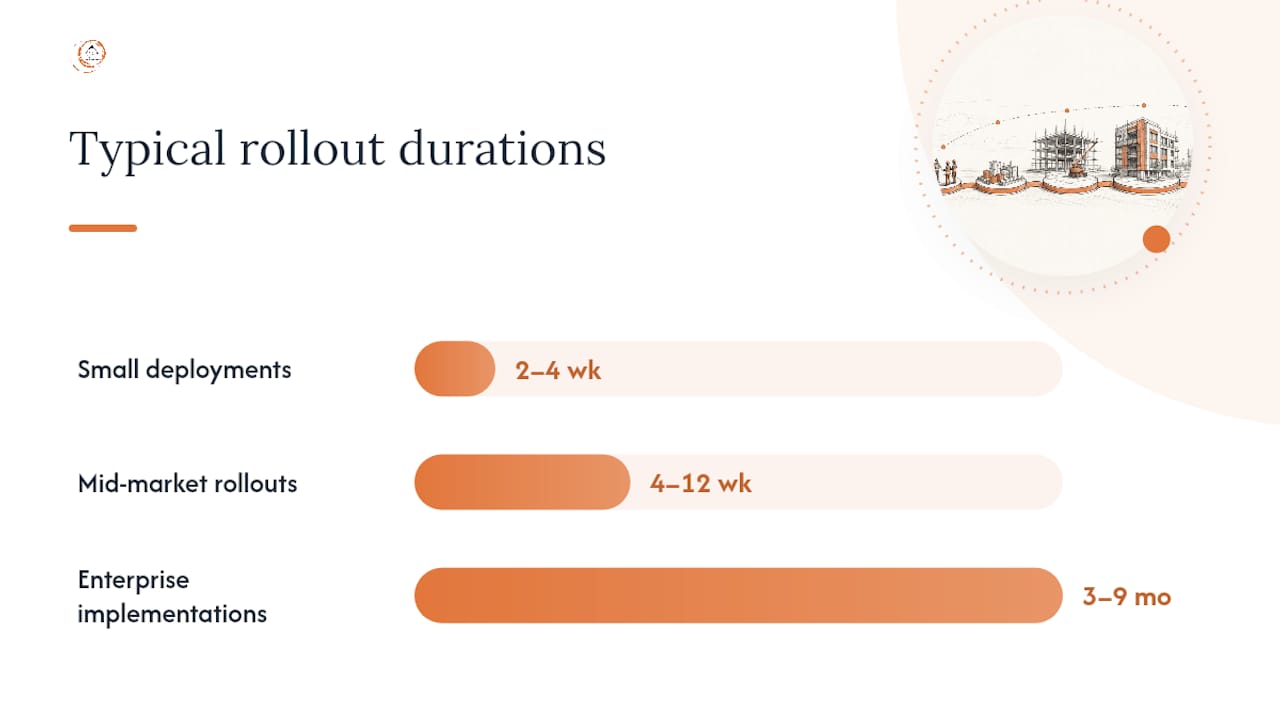
Timelines vary sharply by firm size. Small deployments with minimal customization often run 2 to 4 weeks, mid-market rollouts with integration work take 4 to 12 weeks, and enterprise implementations with heavy customization stretch 3 to 9 months, according to the VBWebSol construction CRM guide. Successful adopters schedule structured check-ins at the 30, 60, and 90 day marks, tracking weekly adoption metrics from week one so problems surface while they’re still cheap to fix.
The most common failure modes are predictable: rushing requirements definition before anyone understands their own workflow, underestimating how long data cleanup actually takes, and treating training as a single kickoff meeting instead of an ongoing process. The iRecruit implementation guide flags all three as the leading causes of stalled rollouts, and every one of them is preventable with the phased approach above. A construction project management implementation guide from Blackbriar covers similar handoff and integration pitfalls worth reviewing before Phase 3.
Adoption itself is fundamentally a change management problem, not a software problem. Research on CRM change management confirms that internal champions and role-specific training drive adoption far more reliably than a one-size-fits-all training session ever will.
How CRM Supports Federal Procurement Readiness
Federal work runs on documentation, and a CRM built for construction needs to hold that documentation the same way an auditor would expect to find it. Structure every record around three anchors: past performance data tied to each completed contract, certified payroll records linked to the relevant project, and a direct reference to the SAM.gov opportunity number that originated the pursuit.
Practical templates matter more than any single feature here. Build a compliance folder inside each project record that tracks required documents by status, not just by presence, so a missing wage determination or an expired bonding letter gets flagged before a bid deadline, not after.
Federal-rconstructionsolutions built its practice on this exact gap: construction firms often have strong field execution but weak documentation trails, and that gap is precisely what disqualifies otherwise-competitive bids during compliance review.
A few compliance cautions apply regardless of which CRM you choose:
- Confirm communication consent settings meet TCPA requirements before enabling automated text or call sequences to prospects.
- Keep an audit-ready trail on every certified payroll entry, since federal contracting officers can request records well after project closeout.
- Never let SAM.gov opportunity links go stale. Federal-rconstructionsolutions helps clients maintain SAM.gov registration so pursuit records stay tied to active, verified listings.
Firms serious about federal growth should read Federal-rconstructionsolutions’s guide on what a CRM for contractors actually does and the companion piece on building a federal contract growth plan for a fuller picture of how pursuit data and compliance documentation intersect.
What Should You Prioritize First?
Firms that succeed with construction CRM implementation almost always fix one leak before touching anything else: slow lead response time. Practitioner reporting backs this up. A CETDIGIT analysis of CRM automation in construction found that firms lose jobs not from bad estimating but from follow-up that simply never happens. Fix that first, prove the ROI with a visible metric, then layer in bid automation and operations handoff packages once your team trusts the system.
Sequencing matters more than feature count. A firm that rolls out five automations in week one and trains everyone in a single session will see slower adoption than a firm that nails lead response, celebrates that early win internally, then expands feature by feature over 90 days.
One more note, aimed at marketing teams building out CRM training materials and case study visuals: construction’s workforce is far more diverse than most stock photography admits. Swap the same middle-aged white male headshot for imagery that actually reflects who’s running pursuits, estimating jobs, and managing sites today.
— Rowena
How Federal-rconstructionsolutions Supports Your CRM Rollout
Federal-rconstructionsolutions built its practice on the very problem this article just walked through: construction firms with strong field execution but weak documentation systems lose winnable bids. That’s the gap Federal-rconstructionsolutions closes, mapping CRM configuration directly to the phases federal contracting demands, from requirements mapping and pilot data migration through SAM.gov opportunity linkage and certified payroll documentation structure.
The concrete outcome clients see is fewer disqualified bids and faster RFP turnaround, because the compliance trail that used to live in scattered folders now lives inside the same pursuit record your BD team already updates weekly. If your firm is chasing federal work and needs your CRM built around FAR and Davis-Bacon documentation requirements from day one, start with Federal-rconstructionsolutions’s federal procurement services to scope what your implementation should actually include.
Sources
For deeper study, review the AGC’s CRM playbook, the Autodesk/FMI disconnected data report, and Federal-rconstructionsolutions’s guide on building a bid pipeline for hands-on next steps.
FAQ
What CRM Do Construction Companies Use?
Construction firms typically use CRM platforms built specifically for the industry rather than generic sales tools, prioritizing pursuit-stage tracking, document storage, and integrations with estimating and accounting software over standard sales-funnel features.
What Is the CRM Implementation Process?
The process runs through five phases: leadership alignment and KPI-setting, requirements mapping and vendor shortlisting, data cleanup and pilot migration, configuration with Go/No-Go scoring, and phased rollout with role-specific training and 30/60/90 day check-ins.
What Does CRM Mean in Construction?
In construction, CRM means a system that tracks pursuits, proposals, and client relationships across a long, non-linear sales cycle, linking documents, bid history, and contacts to each opportunity rather than a simple sales pipeline.
Recommended
- Federal Contract Growth Plan for Construction Firms
- Federal Procurement Lifecycle for Construction Contractors
- CRM for Contractors: What It Is and Why It Matters
- How to Get a Federal Construction Contract: Step-by-Step Guide
Working in the public sector? One short email a week — prevailing wage, certified payroll, bid protests, agency procurement rules. Free, no pitch. Subscribe.
Free and unconditional. No call required, no obligation, unsubscribe anytime.

