Build a Defensible Construction Risk Register in 48 Hours
A construction risk register is a live, decision-grade record of every project threat and opportunity that feeds contingency, ownership, and schedule and cost models. It replaces guesswork with named owners, numeric probabilities, and an audit trail reviewers can actually check. This guide gives you the exact fields, a two-day workshop agenda, sample entries, and the review cadence that keeps the register useful past week one.
TL;DR:
- Numeric probability percentages are essential because they support accurate Monte Carlo modeling and avoid subjective inconsistencies inherent in banded labels.
- Every risk should be mapped to a specific schedule activity and cost line item to ensure contingency calculations are reliable and audit-ready.
- Conduct weekly reviews for critical risks and monthly reviews for all others to maintain register accuracy, with ad-hoc updates after major project changes.
- A well-structured two-day workshop with pre-work, disciplined writing, and quantification produces a practical, audit-proof risk register in a short timeframe.
- Outsourcing risk register setup and review support can help maintain compliance and robustness, especially during busy bid seasons or when internal resources are stretched.
Table of Contents
- What Is a Construction Risk Register, and When Do You Start One?
- Anatomy: The Defensible Fields Every Register Must Include
- How to Build a Working Register in a Two-Day Workshop
- Scoring and Prioritization: Numeric Probability Beats Banded Labels
- Common Construction Risk Categories and Sample Entries
- Maintaining the Register: Ownership, Cadence, and Governance
- Mapping the Register to Schedule, Cost Models, and Contingency
- Tools and Templates: When Excel Stops Being Enough
- Defensible Registers Strengthen Federal Bids and Compliance Reviews
- Field-Tested Traps and Pragmatic Fixes
- Need Help Running the Workshop? Federal-rconstructionsolutions Builds Registers That Survive Audits
- Sources
- FAQ
What Is a Construction Risk Register, and When Do You Start One?
A risk register tracks every identified cost, schedule, technical, health and safety, and commercial threat (and occasional opportunity) that could change project outcomes. It differs from two things people often confuse it with:
- A risk log is usually a rough running list, no scoring, no owners, often just a spreadsheet tab someone updates when they remember.
- A risk database is broader, holding historical risks across multiple projects for lessons-learned lookups.
- A risk register sits in between: project-specific, scored, owned, and reviewed on a set cadence.
Open the register at feasibility or tender stage, before you commit numbers to a bid. During FEED or design development, risks get more specific as drawings firm up. By construction, the register should already reflect subcontractor-level detail, not generic categories left over from the proposal phase. A register that never evolves past its first draft is a red flag during any audit or claim review.
Anatomy: The Defensible Fields Every Register Must Include
A register that can survive an audit or a bid protest needs a minimum of 12 fields. Skip any of these and you have a wish list, not a management tool.
- Risk ID: a unique tracking number, never reused even after closure.
- WHY/WHAT/HOW statement: cause, event, and consequence written as one sentence, not a vague label.
- Category: design, procurement, ground conditions, weather, permits, subcontractor, contractual, or HSE.
- Owner: one named individual, never a department or “team.”
- Probability (%): a numeric figure, not “low/medium/high.”
- Cost impact (min/most likely/max): a three-point range in dollars.
- Schedule impact (min/most likely/max): a three-point range in days.
- Affected activity or cost item: tied to a specific WBS or schedule activity ID.
- Response strategy: avoid, transfer, mitigate, or accept, stated explicitly.
- Residual probability and impact: the leftover exposure after your response is applied.
- Status: open, in progress, closed, or realized.
- Last reviewed date: the single most-checked field in any oversight audit.
Numeric probability and three-point cost or schedule ranges aren’t optional decoration. They’re what feed a quantitative cost and schedule risk analysis, and practitioner templates built for QSRA and QCRA inputs consistently reject banded labels because “medium” means something different to every reviewer in the room.
Pro Tip: Map every risk to a real WBS or activity ID the same day you write it. A risk with no home in the schedule gets forgotten the moment the project gets busy.
How to Build a Working Register in a Two-Day Workshop
You don’t need weeks to produce a usable register. A structured two-day session, followed by disciplined follow-through, gets you there.
- Gather pre-work first. Pull the WBS, baseline schedule, cost estimate, and lessons-learned files from comparable projects before anyone sits down.
- Invite the right people. Project manager, superintendent, lead estimator, scheduler, safety manager, and key subcontractor representatives if they’re already on board.
- Day one: identify and write statements. Brainstorm by category, then force every idea into a WHY/WHAT/HOW sentence. Vague entries get rejected on the spot.
- Day one, afternoon: quantify. Assign probability percentages and three-point cost or schedule ranges to each risk while the discussion is still fresh.
- Day two: plan responses. Assign an owner and a response strategy to every risk scoring above your threshold.
- Day two, close: reconcile. Cross-check cost impacts against the estimate and schedule impacts against activity durations so nothing floats unattached.
For the first 30 days, set your review cadence immediately, reconcile the top ten risks against contingency weekly, and bank the quick wins. A preconstruction kickoff checklist built around this same agenda keeps the workshop from running long.
Scoring and Prioritization: Numeric Probability Beats Banded Labels
Force a numeric probability value on every risk from day one, even a rough estimate is better than “medium.” Banded scales feel faster but they collapse under review because two people rarely agree on what “high” means.
- Assign probability as a percentage (5%, 20%, 60%), never a color or word.
- Record three-point cost and schedule impacts: minimum, most likely, maximum.
- Calculate residual values after your response strategy is applied, not before.
- Plot risks on a 5x5 matrix (probability x impact) for a quick visual triage.
- Escalate anything landing in the top-right quadrant to project governance immediately.
Practitioner guides recommend numeric percentages and three-point ranges specifically because that structure is what a Monte Carlo model needs as input. A 5x5 matrix is fast for triage, but the numeric fields underneath it are what actually drive your contingency math later.
Common Construction Risk Categories and Sample Entries
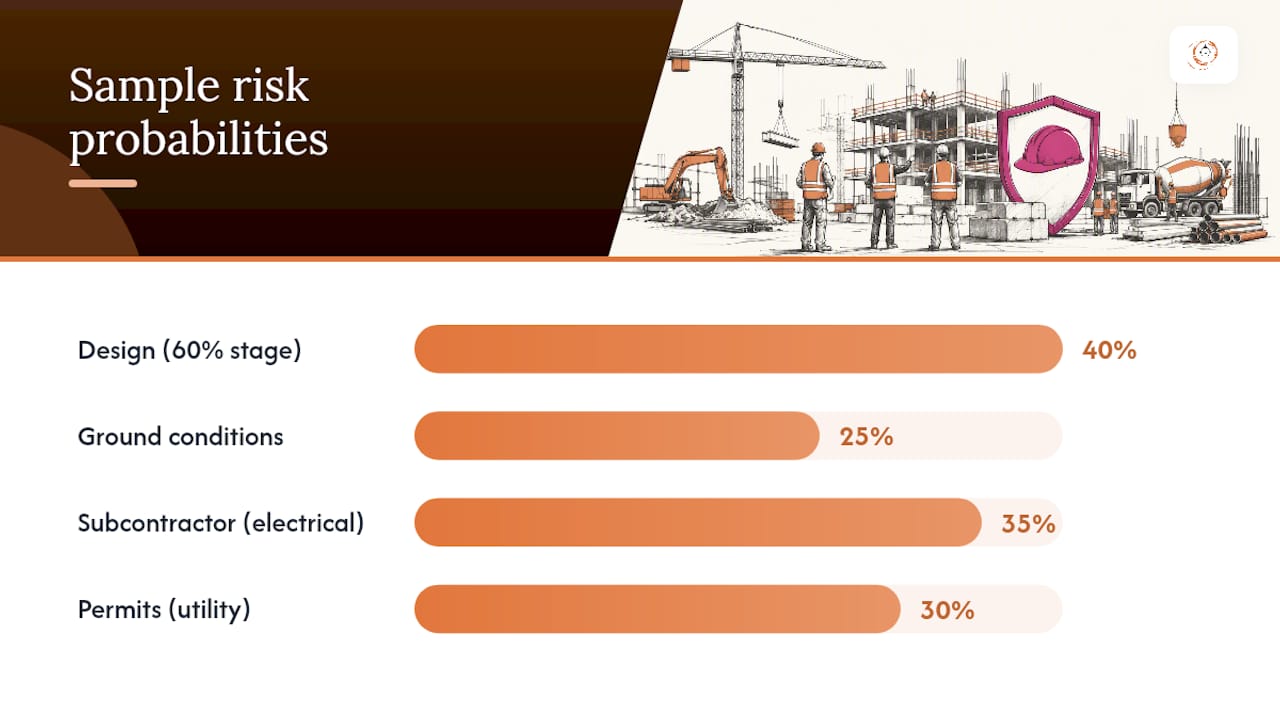
Most construction risk registers fall into a handful of recurring categories: design errors and omissions, procurement and long-lead items, unforeseen ground conditions, weather delays, permit and inspection holdups, subcontractor performance, contractual and commercial disputes, and health and safety incidents.
Here’s how a few of those look once written properly:
- Design: structural steel connection details incomplete at 60% design; probability 40%; cost impact $15,000 to $45,000; schedule impact 5 to 15 days; owner: design manager; mitigation: schedule coordination review before 90% submittal.
- Ground conditions: unforeseen groundwater at excavation depth; probability 25%; cost impact $50,000 to $200,000; schedule impact 10 to 30 days; owner: geotechnical engineer; mitigation: supplemental borings before mobilization.
- Subcontractor: electrical sub has two concurrent projects competing for crew; probability 35%; schedule impact 7 to 20 days; owner: superintendent; mitigation: written manpower commitment with penalty clause.
- Permits: utility relocation permit delayed by municipal review backlog; probability 30%; schedule impact 10 to 25 days; owner: project manager; mitigation: submit 60 days ahead of need date.
Aim for 30 to 80 well-crafted risks rather than a bloated list of vague concerns. Practitioner guidance shows that a top tail of 10 to 15 critical risks usually drives the bulk of your Monte Carlo outcome anyway, so quality beats volume every time.
Maintaining the Register: Ownership, Cadence, and Governance
The project manager owns the register overall, but every individual row needs its own named risk owner, and every mitigation action needs a separate action owner if it’s not the same person.
- Review critical-path risks weekly; review everything else monthly at minimum.
- Trigger an ad-hoc review after any major design change, subcontractor swap, or weather event.
- Log every decision with a date, not just a status change, so the review history stands on its own.
- Record escalations with who was notified and when, not just that governance “was informed.”
- Close risks formally rather than deleting them, so the audit trail stays intact.
Federal transit oversight guidance explicitly expects this kind of documented reconciliation with named accountability, and that expectation is a good bar to hold yourself to even on private work.
Pro Tip: If a risk hasn’t been touched in 60 days, that’s not a stable risk, it’s a stale one. Treat an unreviewed row as a governance failure, not a quiet success.
Mapping the Register to Schedule, Cost Models, and Contingency
Every schedule impact needs to point to a specific activity ID in your P6 or MS Project file, and every cost impact needs to land on a real estimate line item. Generic impacts that float free of the schedule or estimate are the single biggest reason contingency numbers get challenged later.
- Tie schedule impacts to named activity IDs, never a lump “project delay” entry.
- Tie cost impacts to specific cost codes or estimate lines, not a general contingency bucket.
- Carry only residual impacts, after mitigation, into your QCRA or QSRA Monte Carlo model to avoid double-counting the same exposure twice.
- Calculate risk-adjusted contingency from expected values (probability multiplied by impact) summed across the register.
- Question any contingency result that comes out unusually low, that often means residual risks weren’t updated after mitigation was applied.
FTA Oversight Procedure 40 calls for exactly this kind of reconciliation on federally funded transit work, and reviewers on other public projects tend to ask the same questions even without a formal mandate.
Tools and Templates: When Excel Stops Being Enough
A starter Excel file works fine for small to mid-size projects, as long as its columns mirror the 12 fields above exactly, no shortcuts, no missing owner column. Export to CSV or PDF for distribution copies so the working file stays protected from accidental edits.
- Keep one master Excel file with locked formulas for expected value calculations.
- Export read-only PDF snapshots for stakeholder meetings.
- Switch to a dedicated risk platform once you need integration with QCRA or QSRA modeling software, or once you’re running multiple project registers that need to roll up into a portfolio view.
- Field apps suit day-to-day updates from site staff; enterprise platforms suit organizations managing dozens of registers at once.
The rule of thumb is simple: if a spreadsheet still answers every question your reviewer asks, stay with the spreadsheet.
Defensible Registers Strengthen Federal Bids and Compliance Reviews
A register with named owners, dated reviews, and reconciled contingency numbers doubles as evidence during RFP compliance checks and bid reviews. Reviewers on public water and infrastructure work routinely ask for exactly this kind of documentation, escalation history, owner accountability, and a clear line from risk to contingency dollar.
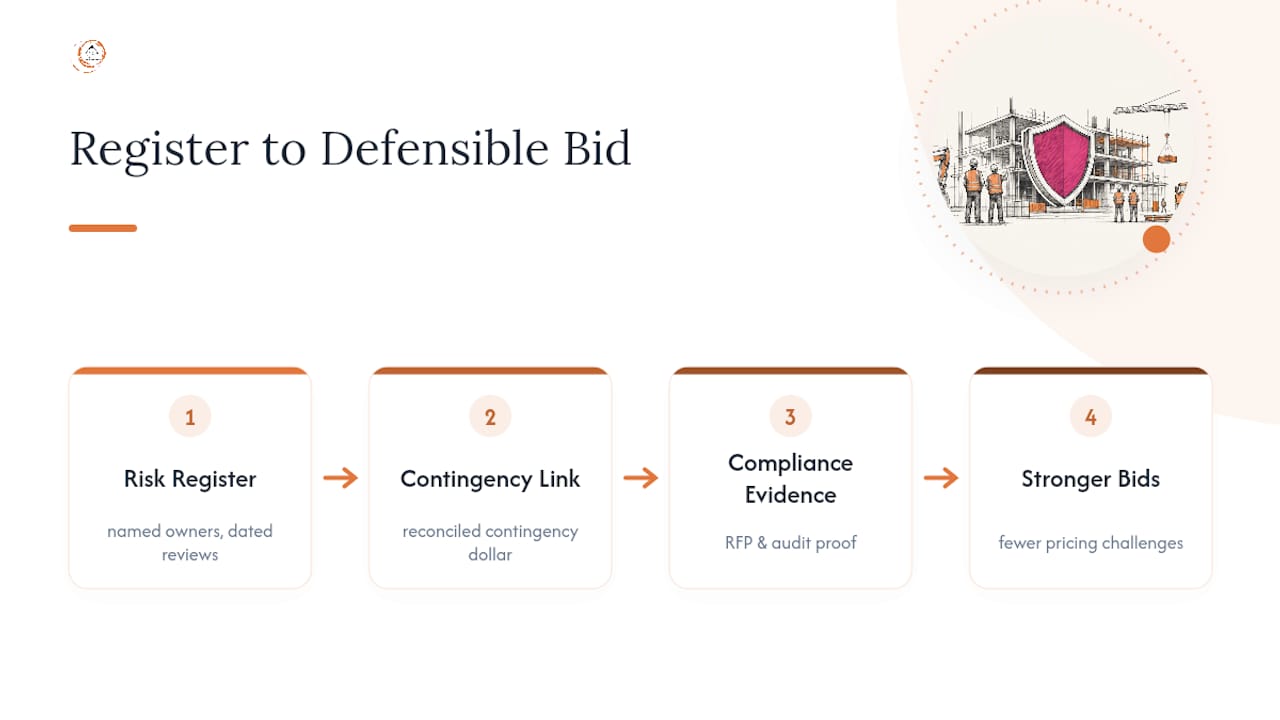
Contractors who show up with a disciplined register, rather than a hastily assembled spreadsheet, tend to face fewer challenges to their pricing assumptions during negotiation. Pairing your register work with a solid preconstruction kickoff checklist and awareness of common federal bidding mistakes keeps your bid package internally consistent from the estimate through the risk-adjusted contingency line.
Field-Tested Traps and Pragmatic Fixes
The same three failures show up on almost every stalled register: entries nobody’s touched in months, risks assigned to a department instead of a person, and probability recorded as “medium” instead of a number. Fix the first two by assigning named owners in the workshop itself, not later. Fix the third by refusing to accept a banded score, ever.
When your project pages show the people running these workshops, use photographs that reflect the actual diversity of today’s construction workforce rather than one recurring look.
— Rowena
Need Help Running the Workshop? Federal-rconstructionsolutions Builds Registers That Survive Audits
Running a two-day risk workshop internally works well when you have the bandwidth and a scheduler who can dedicate real hours to reconciliation. When your team is stretched thin during bid season, that’s where outside help earns its keep.
Federal-rconstructionsolutions builds defensible, audit-ready risk registers as part of its federal procurement consulting services, pairing register setup with RFP compliance support so your contingency numbers and your bid narrative tell the same story. If your risks are already logged but you need help connecting that register to pipeline strategy and bid support, the ConstructConnect bid support offering picks up right where the workshop leaves off. Reach out for a preconstruction consultation and get a register built to hold up under any reviewer’s questions.
Sources
Start with a proven structure rather than building from a blank sheet. The California DOT risk register example shows a level-two register in practice, while the Oregon DOT project risk register spreadsheet offers a ready Excel layout. For oversight expectations on federally funded work, review FTA Oversight Procedure 40, and cross-check HSE entries against OSHA’s construction standards under 29 CFR 1926. For safety-specific mitigation ideas, strategies for reducing construction incidents offer practical detail worth folding into your HSE category.
- FTA Oversight Procedure 40: Risk and contingency review
FAQ
Is a Construction Risk Register Legally Required?
Not universally. Requirements typically come from your contract or owner, and some state procurement statutes mandate documented risk processes for public projects, so check your specific contract clauses before assuming it’s optional.
How Do I Create a Risk Register for My Project?
Run a structured workshop to identify risks by category, write each as a WHY/WHAT/HOW statement, assign numeric probability and three-point cost or schedule ranges, then name an owner and response strategy for every entry.
Who Is Responsible for the Risk Register?
The project manager owns the register overall, but every individual risk needs its own named owner, and mitigation tasks need a separate action owner when that person differs from the risk owner.
How Often Should the Register Be Reviewed?
Review critical-path risks weekly and everything else at least monthly, with ad-hoc reviews triggered by major design changes, subcontractor swaps, or significant weather events.
Recommended
- Subcontractor Prequalification Checklist: What to Verify Before Award
- Root Cause Analysis in Construction: A Practical Guide
- Federal Procurement Compliance Checklist for Contractors
Working in the public sector? One short email a week — prevailing wage, certified payroll, bid protests, agency procurement rules. Free, no pitch. Subscribe.
Free and unconditional. No call required, no obligation, unsubscribe anytime.

