
Service Area Pages for Construction: Build Them Right
A service area page (SAP) is a dedicated landing page that targets a specific city or region where you deliver services but have no physical office or storefront. If you travel to your customers and want to rank in Google searches beyond your Google Business Profile’s immediate proximity zone, you need at least a few of them. Build one when you can back it with real local proof. Skip building dozens of templated city-swap pages — that path leads to penalties, not rankings.
Key Takeaways
A service area page earns rankings by combining local proof, accurate coverage claims, schema markup, and hub-and-spoke internal linking — not by volume of pages published.
| Point | Details |
|---|---|
| Define before you build | A SAP targets a specific city or region where you work but have no storefront; it is not a location page. |
| Proof first, then publish | Every SAP needs at least one local testimonial, one project photo, and a three-to-five question area-specific FAQ before going live. |
| Match GBP to your site | Your GBP service area settings and your SAP coverage claims must align; inconsistency signals inaccuracy to Google. |
| Use hub-and-spoke architecture | Link each SAP from both a service hub and a location hub to prevent orphaned pages and build topical authority. |
| Start with five strong pages | Build five proof-backed SAPs, measure organic clicks and conversions over 60–90 days, then expand in batches. |
Table of Contents
- What is a service area page, and how does it differ from a location page?
- Why do service area pages matter for local SEO?
- What are the risks of doorway pages, and what does Google actually allow?
- What must every high-impact service area page include?
- How should you structure your site’s architecture for service area pages?
- How many service area pages should you build, and where do you start?
- What do strong service area page templates look like in practice?
- What research and expert guidance actually moves the needle on SAPs?
- An editorial note from the Federal-rconstructionsolutions team
- Sources
- FAQ
What is a service area page, and how does it differ from a location page?
These two page types solve different problems, and mixing them up costs you both rankings and credibility.
A location page exists to tell customers where to find you. It displays your address, business hours, a parking note, and a Google Maps embed pinned to your storefront. A hardware store, a dental office, or a showroom uses a location page because customers physically visit that address.
A service area page flips that model. You go to the customer. There is no address to display, no door to walk through. The page’s job is to prove you serve a specific geographic market, that you understand its local conditions, and that you can be trusted to show up and do the work. A plumber who covers five suburbs around a metro core needs SAPs, not location pages.
| Attribute | Service Area Page | Location Page |
|---|---|---|
| Address displayed | No (or general region only) | Yes, full street address |
| Map behavior | Service radius or city boundary | Pinned storefront marker |
| Google Business Profile type | Service-area business (SAB) | Storefront listing |
| Primary content focus | Local proof, coverage, and trust | Directions, hours, and visit info |
| Primary CTA | Call or request a quote | Get directions or book in-store |
A plumber who travels to five suburbs needs SAPs. A storefront hardware store needs location pages. The distinction matters because Google’s GBP guidance is explicit: service-area businesses should not display a physical address when customers do not visit that location, and GBP allows you to define coverage by radius or city instead.
Why do service area pages matter for local SEO?
SAPs are the primary organic vehicle for ranking outside your GBP proximity zone. When someone in a neighboring city searches “HVAC repair near me” or “concrete contractor in [city],” your GBP listing alone rarely surfaces. A well-built SAP gives Google a dedicated, crawlable signal that you serve that market.
The core SEO benefits are direct:
- Rank for service + city queries. Each SAP targets a specific keyword combination (“roof repair Naperville,” “plumbing contractor Schaumburg”) that a single homepage cannot cover.
- Extend organic reach beyond GBP proximity. GBP rankings are heavily weighted toward physical proximity. SAPs let you compete organically in cities where you have no office.
- Convert local intent. A visitor who lands on a page that names their city, lists their neighborhood, and shows a completed project nearby is far more likely to call than one who lands on a generic homepage.
- Feed your bid pipeline. For construction businesses, local visibility from SAPs connects directly to building a consistent bid pipeline and private sector opportunity flow.
Which businesses need SAPs?
- Plumbers and HVAC contractors travel to every job. They need SAPs for every city they regularly serve, because their GBP proximity zone covers only a fraction of their actual footprint.
- Mobile construction services (concrete pouring, site grading, demolition) operate across wide geographic areas and rarely have satellite offices to anchor GBP listings.
- Small B2B contractors pursuing municipal or private work in multiple jurisdictions benefit from SAPs that reference local permit requirements and project history.
- Specialty tradespeople (electricians, roofers, painters) who serve a metro area from a single shop location need SAPs to compete in the suburbs where their GBP signal is weak.
One exception: if you serve a single city and your homepage already ranks well for local queries, a single strong combined page often outperforms a cluster of thin city pages. Quality always beats volume.
What are the risks of doorway pages, and what does Google actually allow?
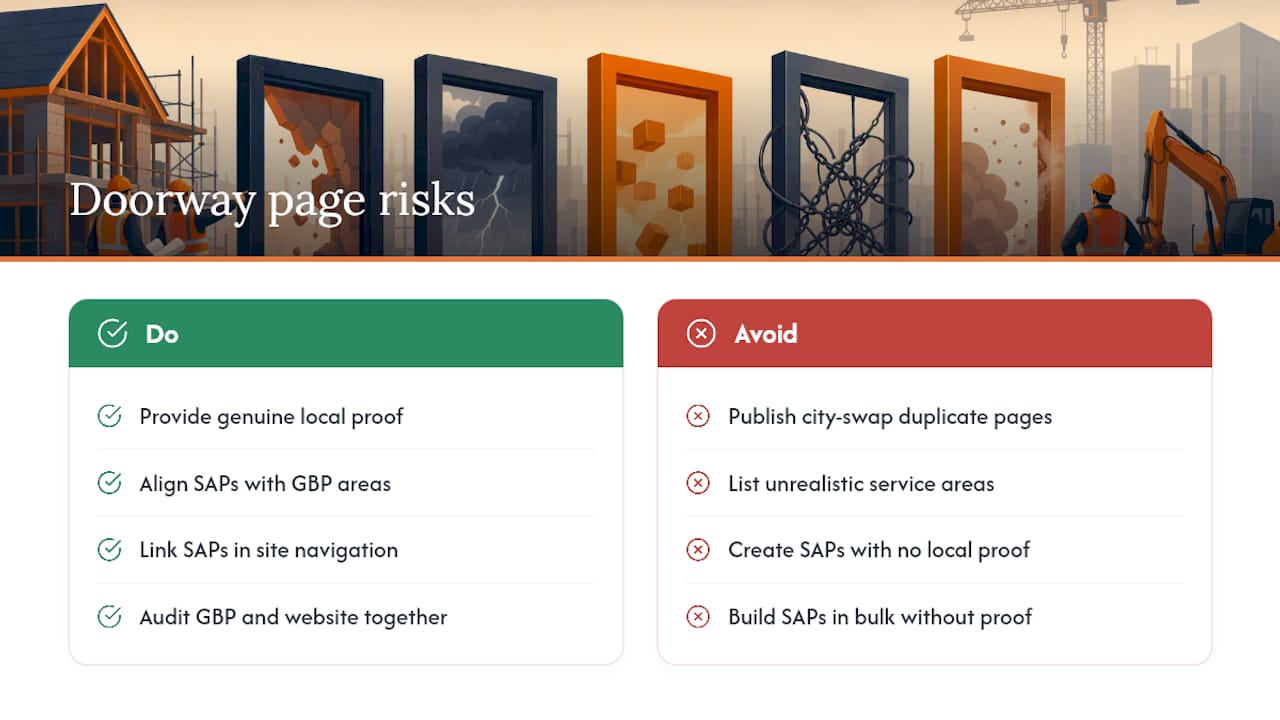
This is where most businesses go wrong, and the consequences are serious. Google’s spam policies explicitly caution against near-duplicate pages created purely to rank. Programmatic city-swap pages — where the only difference between pages is the city name swapped into a template — can be classified as doorway content and removed or devalued from search results entirely.
What Google allows: SAPs that provide genuine, locally differentiated content. A page that explains how you handle permit requirements in a specific municipality, includes photos from a job in that city, and answers questions specific to that area is not a doorway page. It is a useful resource.
What triggers doorway classification: Pages where the body text is identical except for the city name, pages with no local proof, and pages that exist only to funnel traffic to a contact form with no substantive content.
Do: Align your SAP content with your GBP service area settings. If your GBP lists coverage in Cook County and DuPage County, your SAPs should reflect those same boundaries. Inconsistency between your GBP and your website signals to Google that one or both are inaccurate.
Don’t: Claim service areas you cannot realistically cover. Listing 40 cities when you operate from one location and have no local proof for most of them is a credibility problem for users and a policy risk with Google.
Do: Link SAPs into your site’s main navigation or a dedicated service-area hub. Orphaned pages that are not internally linked rarely get indexed and never build authority.
Don’t: Build SAPs in bulk before you have local proof. One strong page with a real testimonial, a real project photo, and a real FAQ outperforms ten thin pages every time.
Pro Tip: The most common non-obvious error is publishing SAPs that contradict your GBP service area settings. If your GBP says you serve three counties but your website has SAPs for 25 cities across six counties, Google reads that as a signal that neither source is accurate. Audit both together, not separately.
What must every high-impact service area page include?
BrightLocal’s guidance on service area pages identifies a consistent set of elements that separate rankable, converting SAPs from thin pages that get ignored. Here is the practical checklist.
Headline and meta rules
Your H1 should follow the pattern: [Primary Service] in [City/Region]. Your title tag should match closely and stay under 60 characters. Your meta description should answer the visitor’s first question: “Do you serve my area?” in the first sentence.
Core on-page blocks every SAP needs:
- Direct answer up front. The first paragraph confirms you serve the area, names specific neighborhoods or ZIP codes, and states your response time or service window.
- Services list. A clear, scannable list of what you offer in that location, not a copy-paste of your homepage services page.
- Exact coverage boundaries. Name the neighborhoods, roads, or ZIP codes you cover. “We serve the greater Chicago area” tells a visitor nothing. “We cover Oak Park, River Forest, and Berwyn, including ZIP codes 60301–60305” tells them everything.
- Travel and fee notes. If you charge a trip fee outside a core radius, say so. Transparency reduces bounce rate.
- Local proof. At minimum: one city-specific testimonial, one project photo from that location with descriptive alt text (e.g., “Concrete foundation pour on Elm Street, Naperville, IL”), and a brief case study or project description.
- Area-specific FAQ. Three to five questions that a customer in that specific city would actually ask — permit timelines, local material availability, access restrictions in gated communities.
- Clear CTA. A phone number and a quote-request form, both visible above the fold and repeated at the bottom of the page.
- Internal links. Links back to your main service hub pages and to related city pages where relevant.
Schema markup
Structured data types that matter for SAPs include LocalBusiness, Service, areaServed (using GeoCircle or GeoShape), FAQPage, and Review schema. As xSquareSEO notes, schema helps search engines understand the page and can feed AI Overviews and rich results, but it must reflect what is actually visible on the page. Never mark up a claim in schema that does not appear in your body copy.
Visual proof
Use original photos from actual jobs in that city. Add location-descriptive alt text. Avoid stock photography — it signals to both users and algorithms that you have never actually worked in the area. When featuring people in job-site photos, reflect the real diversity of the construction workforce: women, workers of color, and professionals of different ages all belong in these images.

| Element | SAP | Location Page |
|---|---|---|
| City-specific testimonial | Required | Optional |
| Project photo with local alt text | Required | Recommended |
| Street address | Omit | Required |
| Area-specific FAQ | Required | Optional |
| Schema type | LocalBusiness + areaServed | LocalBusiness + address |
Minimum practical thresholds: at least one city-specific testimonial, at least one local project photo, and a FAQ section of three to five questions tied to that specific area.
Pro Tip: Before writing a word of body copy, pull the actual search queries driving traffic to your existing pages in Google Search Console. The questions your current visitors ask are the exact FAQ content your new SAPs need.
Industry analyses in 2026 show that SAPs with local uniqueness, schema, and internal linking consistently rank, while templated sets were widely deindexed after recent algorithm updates.
How should you structure your site’s architecture for service area pages?
The hub-and-spoke model is the standard approach, and it works because it gives both crawlers and users a logical map of your coverage.
How the model works:
Your site has two types of hub pages:
- Service hubs (e.g.,
/plumbing/,/hvac/,/concrete-work/) that describe what you do across your full service area. - Location hubs (e.g.,
/service-areas/cook-county/) that describe where you work across all your services.
Each SAP sits at the intersection: /plumbing/naperville/ or /service-areas/naperville/plumbing/. It receives links from both its service hub and its location hub, giving it two independent link paths into the site.
Two intersecting link paths:
- Service-first path: Service hub → SAP → related city pages
- Location-first path: Location hub → SAP → related service pages
This architecture prevents orphaned pages and signals topical authority to search engines. Pipelineon’s 2026 analysis confirms that internal linking and hub-and-spoke structure materially affect whether SAPs get crawled and ranked.
Technical checklist for developers:
- Add every SAP to your XML sitemap and submit it via Google Search Console.
- Set a self-referencing canonical tag on each SAP (
<link rel="canonical" href="[page URL]" />). - Confirm mobile performance: SAPs are heavily accessed on mobile by users searching in the field.
- Place structured data in the
<head>or as a JSON-LD block immediately before</body>. - Use a Google Maps embed showing a service radius or a named area boundary, not a pinned address (which contradicts your SAB GBP settings).
- Check crawl coverage in Google Search Console after publishing. Any SAP showing “Discovered — currently not indexed” is likely an orphan or has a thin-content signal.
Avoid these technical errors:
- Duplicate meta titles across city pages (each SAP needs a unique title tag).
- Blocking SAPs in
robots.txtduring staging and forgetting to unblock them at launch. - Embedding the same static map on every SAP — use a map that reflects the specific city or radius for that page.
How many service area pages should you build, and where do you start?
More pages do not mean more rankings. Practitioner playbooks consistently report that five strong pages outperform dozens of thin ones. The right number is determined by demand, proof, and your actual service capacity.
Prioritization framework:
- Audit demand. Use Google Search Console and a keyword tool to identify which city + service combinations already drive impressions or clicks. Start where demand exists.
- Audit your proof. List every city where you have a completed project, a client testimonial, or a referral relationship. These are your first SAPs.
- Assess revenue per area. Which cities produce your highest-value contracts? Prioritize those, even if search volume is moderate.
- Consider travel cost and response time. A city two hours away may have high search volume but low margin. Factor that into your build order.
- Build your top five. Create five fully proof-backed SAPs before expanding. Measure their performance over 60–90 days.
- Expand in batches. Once your first five pages show organic clicks and conversions, add the next batch using the same proof-first standard.
KPIs to track when scaling:
- Organic clicks by landing page (Google Search Console)
- Calls and form submissions attributed to each SAP (Google Analytics 4 + call tracking)
- Time on page and bounce rate per SAP
- Conversion rate by city (calls or bookings divided by sessions)
A CRM built for contractors makes it significantly easier to attribute inbound leads to specific SAPs and measure which cities are actually producing revenue, not just traffic.
What do strong service area page templates look like in practice?
The difference between a page that ranks and one that gets ignored usually comes down to specificity. Here is a before/after example for a concrete contractor.
Before (thin, templated):
After (proof-backed SAP):
The second version answers three questions RankAI identifies as conversion-critical: “Do you serve my area?” “Can you handle my problem?” “Can I trust you?”
Three quick templates you can adapt:
H1 + opening sentence:
- [Service] in [City], [State] — [Company Name]
- Opening: “We serve [City] and the surrounding [neighborhood names], with [response time or availability note].”
Coverage statement (3 lines):
- “Our [City] service area covers [neighborhood 1], [neighborhood 2], and [ZIP codes].”
- “We handle [permit type] requirements and carry [relevant insurance/license].”
- “Most jobs in [City] are scheduled within [X business days].”
FAQ starter set:
- “Do you serve [specific neighborhood in city]?”
- “What permits are required for [service type] in [City]?”
- “How quickly can you start a job in [City]?”
For construction-specific audiences, you can reference permit knowledge and response windows without exposing client data. Mentioning that you are familiar with a city’s building department review process, or that you maintain a materials depot within 20 miles of the service area, adds credibility without disclosing anything confidential. For firms pursuing municipal procurement opportunities, SAPs that reference local regulatory familiarity also signal competence to procurement officers who may review your web presence.
Partner resources like GCS Contractors’ local landing page approach show how construction firms can structure location-specific content to build trust with both search engines and prospective clients.
What research and expert guidance actually moves the needle on SAPs?
The practitioners who consistently produce ranking SAPs share one habit: they write pages that could only have been written by someone who has actually worked in that city.
Therese Kopiwoda’s guidance calls this “lived-in specificity.” It means naming the actual neighborhoods you work in, noting how you handle gated-community access policies, referencing the local building department’s permit process, and describing a real project outcome. These details are impossible to fake at scale, which is exactly why algorithms and AI systems use them as authenticity signals.
Internal linking is the other high-leverage factor that most builders underestimate. Weaving contextual links to your service hub and related city pages into the body prose — not just the footer — tells crawlers that the page belongs to a coherent topical cluster. A SAP that links to your main plumbing hub, your adjacent city pages, and your contact page from within the body text is structurally stronger than one that only links from a sidebar widget.
Pro Tip: Build your proof assets before you write the page. Collect one local testimonial, one project photo with location-specific alt text, and one area-specific FAQ answer. Those three assets are the minimum viable proof set. Everything else — word count, schema, internal links — supports them, not the other way around.
Algorithm behavior in 2026 reporting confirms the pattern: pages with local uniqueness, schema, and internal linking rank consistently, while programmatic templated sets continue to be deindexed at scale. The signal is clear. Fewer pages with real proof outperform more pages with none.
An editorial note from the Federal-rconstructionsolutions team
At Federal-rconstructionsolutions, we work with construction businesses every day that are trying to compete in markets where their digital presence does not yet match their actual capabilities. Service area pages are one of the most direct ways to close that gap. The tactics in this guide are drawn from applied work in federal and private sector construction marketing, where local credibility and geographic specificity are not optional — they are the baseline expectation.
If you are building SAPs for the first time or auditing pages that are not ranking, our team can help you identify which cities to prioritize, what proof assets to collect, and how to structure your site architecture for both local SEO and federal procurement visibility. Our federal procurement consulting services and private sector growth support are built specifically for construction businesses that need more than generic marketing advice.
Sources
- Optimize Service Area Pages for Local Intent | BrightLocal
- Google Business Profile help: Set or change your business’s service area
- Spam policies — Google Search Central
- Service Area Pages SEO in 2026
FAQ
What is a service area page?
A service area page is a dedicated website page targeting a specific city or region where a business delivers services without a physical storefront there. It helps the business rank for local search queries in that geographic market.
What is an example of a service area in construction?
A concrete contractor based in Chicago who regularly pours foundations in Naperville, Schaumburg, and Aurora would create a separate SAP for each city, naming neighborhoods served, local permit requirements, and completed projects in that area.
What should a service area page include?
Every SAP needs a city-specific H1, exact coverage boundaries (neighborhoods or ZIP codes), at least one local testimonial, one project photo with descriptive alt text, an area-specific FAQ, a clear call-to-action, and LocalBusiness plus areaServed schema markup.
What is the definition of a service area for a Google Business Profile?
Google defines a service area as the geographic region a business covers when traveling to customers, configured in GBP by radius or by named cities and counties. Google’s guidance specifies that service-area businesses should not display a physical address when customers do not visit that location.
How many service area pages should a small contractor build?
Start with five fully proof-backed pages targeting your highest-demand, highest-revenue cities. Measure organic clicks, calls, and conversions over 60–90 days before expanding to additional markets.

